Version v1.10.0 Jul 21, 2026
1. Format Overview
1.1. Namespace – HDMF Common
Description: Common data structures provided by HDMF
Name: hdmf-common
Full Name: HDMF Common
Version: 1.10.0
- Authors:
Andrew Tritt
Oliver Ruebel
Ryan Ly
Ben Dichter
- Schema:
doc: base data types
source: base.yaml
title: Base data types
doc: data types for a column-based table
source: table.yaml
title: Table data types
doc: data types for different types of sparse matrices
source: sparse.yaml
title: Sparse data types
doc: data types for storing references to web accessible resources
source: resources.yaml
title: Resource reference data types
1.2. Type Hierarchy
2. Type Specifications
2.1. Base data types
base data types
2.1.1. Data
Overview: An abstract data type for a dataset.
Primitive Type: Dataset
Subtypes: VectorIndex, DynamicTableRegion, ElementIdentifiers, VectorData
Source filename: base.yaml
Source Specification: see Section 3.2.1
2.1.2. Container
Overview: An abstract data type for a group storing collections of data and metadata. Base type for all data and metadata containers.
Primitive Type: Group
Subtypes: MeaningsTable, CSRMatrix, HERD, DynamicTable, AlignedDynamicTable, SimpleMultiContainer
Source filename: base.yaml
Source Specification: see Section 3.2.2
2.1.3. SimpleMultiContainer
Overview: A simple Container for holding onto multiple containers.
SimpleMultiContainer extends Container and includes all elements of Container with the following additions or changes.
Extends: Container
Primitive Type: Group
Inherits from: Container
Source filename: base.yaml
Source Specification: see Section 3.2.3

Id |
Type |
Description |
|---|---|---|
<SimpleMultiContainer> |
Group |
Top level Group for <SimpleMultiContainer>
|
.<Data> |
Dataset |
Data objects held within this SimpleMultiContainer.
|
Id |
Type |
Description |
|---|---|---|
<SimpleMultiContainer> |
Group |
Top level Group for <SimpleMultiContainer>
|
.<Container> |
Group |
Container objects held within this SimpleMultiContainer.
|
2.1.3.1. Groups: <Container>
Container objects held within this SimpleMultiContainer.
Extends: Container
Quantity: 0 or more
2.2. Table data types
data types for a column-based table
2.2.1. VectorData
Overview: An n-dimensional dataset representing a column of a DynamicTable. If used without an accompanying VectorIndex, first dimension is along the rows of the DynamicTable and each step along the first dimension is a cell of the larger table. VectorData can also be used to represent a ragged array if paired with a VectorIndex. This allows for storing arrays of varying length in a single cell of the DynamicTable by indexing into this VectorData. The first vector is at VectorData[0:VectorIndex[0]]. The second vector is at VectorData[VectorIndex[0]:VectorIndex[1]], and so on.
VectorData extends Data and includes all elements of Data with the following additions or changes.
Extends: Data
Primitive Type: Dataset
Dimensions: [[‘dim0’], [‘dim0’, ‘dim1’], [‘dim0’, ‘dim1’, ‘dim2’], [‘dim0’, ‘dim1’, ‘dim2’, ‘dim3’]]
Shape: [[None], [None, None], [None, None, None], [None, None, None, None]]
Inherits from: Data
Subtypes: VectorIndex, DynamicTableRegion
Source filename: table.yaml
Source Specification: see Section 3.3.1
Id |
Type |
Description |
|---|---|---|
<VectorData> |
Dataset |
Top level Dataset for <VectorData>
|
.description |
Attribute |
Description of what these vectors represent.
|
2.2.2. VectorIndex
Overview: Used with VectorData to encode a ragged array. An array of indices into the first dimension of the target VectorData, forming a map between the rows of a DynamicTable and the indices of the VectorData. The name of the VectorIndex is expected to be the name of the target VectorData object followed by “_index”.
VectorIndex extends VectorData and includes all elements of VectorData with the following additions or changes.
Extends: VectorData
Primitive Type: Dataset
Data Type: uint8
Dimensions: [‘num_rows’]
Shape: [None]
Inherits from: VectorData, Data
Source filename: table.yaml
Source Specification: see Section 3.3.2
Id |
Type |
Description |
|---|---|---|
<VectorIndex> |
Dataset |
Top level Dataset for <VectorIndex>
|
.target |
Attribute |
Reference to the target dataset that this index applies to.
|
2.2.3. ElementIdentifiers
Overview: A list of unique identifiers for values within a dataset, e.g. rows of a DynamicTable.
ElementIdentifiers extends Data and includes all elements of Data with the following additions or changes.
Extends: Data
Primitive Type: Dataset
Data Type: int32
Dimensions: [‘num_elements’]
Shape: [None]
Default Name: element_id
Inherits from: Data
Source filename: table.yaml
Source Specification: see Section 3.3.3
2.2.4. DynamicTableRegion
Overview: DynamicTableRegion provides a link from one table to an index or region of another. The table attribute is a link to another DynamicTable, indicating which table is referenced, and the data is int(s) indicating the row(s) (0-indexed) of the target array. DynamicTableRegion`s can be used to associate rows with repeated meta-data without data duplication. They can also be used to create hierarchical relationships between multiple `DynamicTable`s. `DynamicTableRegion objects may be paired with a VectorIndex object to create ragged references, so a single cell of a DynamicTable can reference many rows of another DynamicTable.
DynamicTableRegion extends VectorData and includes all elements of VectorData with the following additions or changes.
Extends: VectorData
Primitive Type: Dataset
Data Type: int32
Dimensions: [‘num_rows’]
Shape: [None]
Inherits from: VectorData, Data
Source filename: table.yaml
Source Specification: see Section 3.3.4

Id |
Type |
Description |
|---|---|---|
<DynamicTableRegion> |
Dataset |
Top level Dataset for <DynamicTableRegion>
|
.table |
Attribute |
Reference to the DynamicTable object that this region applies to.
|
.description |
Attribute |
Description of what this table region points to.
|
2.2.5. DynamicTable
Overview: A group containing multiple datasets that are aligned on the first dimension (Currently, this requirement is left up to APIs to check and enforce). These datasets represent different columns in the table. Apart from a column that contains unique identifiers for each row, there are no other required datasets. Users are free to add any number of custom VectorData objects (columns) here. DynamicTable also supports ragged array columns, where each element can be of a different size. To add a ragged array column, use a VectorIndex type to index the corresponding VectorData type. See documentation for VectorData and VectorIndex for more details. Unlike a compound data type, which is analogous to storing an array-of-structs, a DynamicTable can be thought of as a struct-of-arrays. This provides an alternative structure to choose from when optimizing storage for anticipated access patterns. Additionally, this type provides a way of creating a table without having to define a compound type up front. Although this convenience may be attractive, users should think carefully about how data will be accessed. DynamicTable is more appropriate for column-centric access, whereas a dataset with a compound type would be more appropriate for row-centric access. Finally, data size should also be taken into account. For small tables, performance loss may be an acceptable trade-off for the flexibility of a DynamicTable.
DynamicTable extends Container and includes all elements of Container with the following additions or changes.
Extends: Container
Primitive Type: Group
Inherits from: Container
Subtypes: MeaningsTable, AlignedDynamicTable
Source filename: table.yaml
Source Specification: see Section 3.3.5
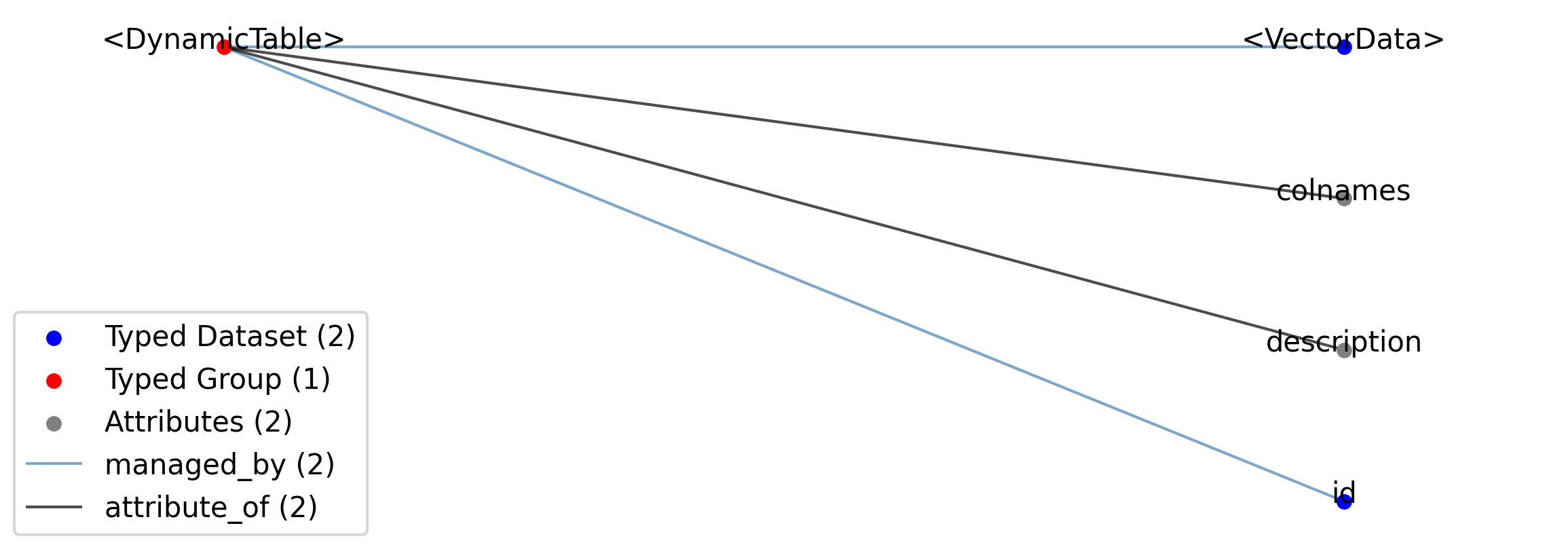
Id |
Type |
Description |
|---|---|---|
<DynamicTable> |
Group |
Top level Group for <DynamicTable>
|
.colnames |
Attribute |
The names of the columns in this table. This should be used to specify an order to the columns.
|
.description |
Attribute |
Description of what is in this dynamic table.
|
.id |
Dataset |
Array of unique identifiers for the rows of this dynamic table.
|
.<VectorData> |
Dataset |
Vector columns, including index columns, of this dynamic table.
|
Id |
Type |
Description |
|---|---|---|
<DynamicTable> |
Group |
Top level Group for <DynamicTable>
|
.meanings_tables |
Group |
Group containing MeaningsTable objects that provide meanings for values in VectorData columns within this DynamicTable.
|
2.2.5.1. Groups: meanings_tables
Group containing MeaningsTable objects that provide meanings for values in VectorData columns within this DynamicTable.
Quantity: 0 or 1
Name: meanings_tables
Id |
Type |
Description |
|---|---|---|
meanings_tables |
Group |
Top level Group for meanings_tables
|
Group |
MeaningsTable objects that provide meanings for values in VectorData columns within this DynamicTable. Tables should be named according to the column they provide meanings for with a “_meanings” suffix. e.g., if a VectorData column is named “stimulus_type”, the corresponding MeaningsTable should be named “stimulus_type_meanings”.
|
2.2.5.2. Groups: meanings_tables/<MeaningsTable>
MeaningsTable objects that provide meanings for values in VectorData columns within this DynamicTable. Tables should be named according to the column they provide meanings for with a “_meanings” suffix. e.g., if a VectorData column is named “stimulus_type”, the corresponding MeaningsTable should be named “stimulus_type_meanings”.
Extends: MeaningsTable
Quantity: 0 or more
2.2.6. AlignedDynamicTable
Overview: DynamicTable container that supports storing a collection of sub-tables. Each sub-table is a DynamicTable itself that is aligned with the main table by row index. I.e., all DynamicTables stored in this group MUST have the same number of rows. This type effectively defines a 2-level table in which the main data is stored in the main table implemented by this type and additional columns of the table are grouped into categories, with each category being represented by a separate DynamicTable stored within the group.
AlignedDynamicTable extends DynamicTable and includes all elements of DynamicTable with the following additions or changes.
Extends: DynamicTable
Primitive Type: Group
Inherits from: DynamicTable, Container
Source filename: table.yaml
Source Specification: see Section 3.3.6

Id |
Type |
Description |
|---|---|---|
<AlignedDynamicTable> |
Group |
Top level Group for <AlignedDynamicTable>
|
.categories |
Attribute |
The names of the categories in this AlignedDynamicTable. Each category is represented by one DynamicTable stored in the parent group. This attribute should be used to specify an order of categories and the category names must match the names of the corresponding DynamicTable in the group.
|
Id |
Type |
Description |
|---|---|---|
<AlignedDynamicTable> |
Group |
Top level Group for <AlignedDynamicTable>
|
.<DynamicTable> |
Group |
A DynamicTable representing a particular category for columns in the AlignedDynamicTable parent container. The table MUST be aligned with (i.e., have the same number of rows) as all other DynamicTables stored in the AlignedDynamicTable parent container. The name of the category is given by the name of the DynamicTable and its description by the description attribute of the DynamicTable.
|
2.2.6.1. Groups: <DynamicTable>
A DynamicTable representing a particular category for columns in the AlignedDynamicTable parent container. The table MUST be aligned with (i.e., have the same number of rows) as all other DynamicTables stored in the AlignedDynamicTable parent container. The name of the category is given by the name of the DynamicTable and its description by the description attribute of the DynamicTable.
Extends: DynamicTable
Quantity: 0 or more
2.2.7. MeaningsTable
Overview: A table to store information about the meanings of values in a referenced VectorData object. All possible values of the referenced VectorData object should be present in the ‘value’ column of this table, even if the value is not observed in the data. Additional columns may be added to store additional metadata about each value. The name of the MeaningsTable should correspond to the name of the referenced VectorData object with a “_meanings” suffix. e.g., if the referenced VectorData object is named “stimulus_type”, the corresponding MeaningsTable should be named “stimulus_type_meanings”.
MeaningsTable extends DynamicTable and includes all elements of DynamicTable with the following additions or changes.
Extends: DynamicTable
Primitive Type: Group
Inherits from: DynamicTable, Container
Source filename: table.yaml
Source Specification: see Section 3.3.7

Id |
Type |
Description |
|---|---|---|
<MeaningsTable> |
Group |
Top level Group for <MeaningsTable>
|
.target |
Attribute |
Reference to the VectorData object for which this table provides meanings.
|
.value |
Dataset |
The value of a row in the referenced VectorData object.
|
.meaning |
Dataset |
The meaning of the value in the referenced VectorData object.
|
2.3. Sparse data types
data types for different types of sparse matrices
2.3.1. CSRMatrix
Overview: A compressed sparse row matrix. Data are stored in the standard CSR format, where column indices for row i are stored in indices[indptr[i]:indptr[i+1]] and their corresponding values are stored in data[indptr[i]:indptr[i+1]].
CSRMatrix extends Container and includes all elements of Container with the following additions or changes.
Extends: Container
Primitive Type: Group
Inherits from: Container
Source filename: sparse.yaml
Source Specification: see Section 3.4.1
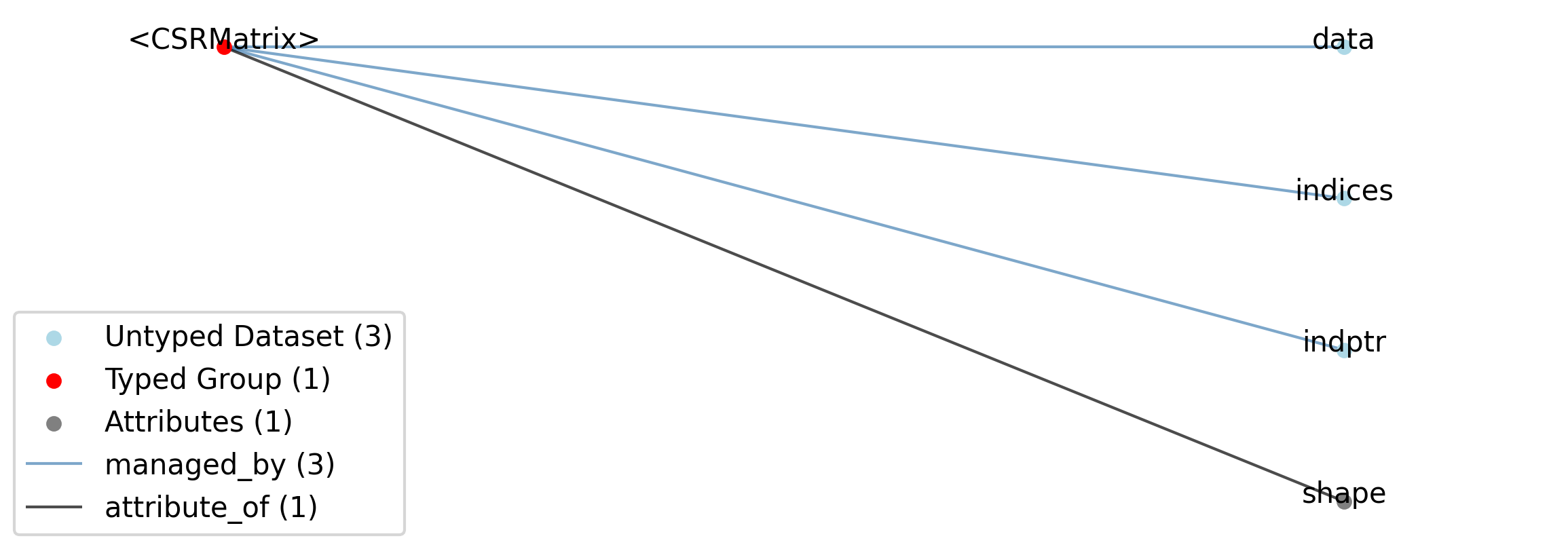
Id |
Type |
Description |
|---|---|---|
<CSRMatrix> |
Group |
Top level Group for <CSRMatrix> |
.shape |
Attribute |
The shape (number of rows, number of columns) of this sparse matrix.
|
.indices |
Dataset |
The column indices.
|
.indptr |
Dataset |
The row index pointer.
|
.data |
Dataset |
The non-zero values in the matrix.
|
2.4. Resource reference data types
data types for storing references to web accessible resources
2.4.1. HERD
Overview: HDMF External Resources Data Structure. A set of six tables for tracking external resource references in a file or across multiple files.
HERD extends Container and includes all elements of Container with the following additions or changes.
Extends: Container
Primitive Type: Group
Inherits from: Container
Source filename: resources.yaml
Source Specification: see Section 3.5.1

Id |
Type |
Description |
|---|---|---|
<HERD> |
Group |
Top level Group for <HERD> |
.keys |
Dataset |
A table for storing user terms that are used to refer to external resources.
|
.files |
Dataset |
A table for storing object ids of files used in external resources.
|
.entities |
Dataset |
A table for mapping user terms (i.e., keys) to resource entities.
|
.objects |
Dataset |
A table for identifying which objects in a file contain references to external resources.
|
.object_keys |
Dataset |
A table for identifying which objects use which keys.
|
.entity_keys |
Dataset |
A table for identifying which keys use which entity.
|
3. Schema Sources
Source Specification: see Section 3.1
3.1. Namespace – HDMF Common
Description: see Section 1.1
YAML Specification:
 1name: hdmf-common
 2doc: Common data structures provided by HDMF
 3schema:
 4- doc: base data types
 5  source: base.yaml
 6  title: Base data types
 7- doc: data types for a column-based table
 8  source: table.yaml
 9  title: Table data types
10- doc: data types for different types of sparse matrices
11  source: sparse.yaml
12  title: Sparse data types
13- doc: data types for storing references to web accessible resources
14  source: resources.yaml
15  title: Resource reference data types
16full_name: HDMF Common
17version: 1.10.0
18author:
19- Andrew Tritt
20- Oliver Ruebel
21- Ryan Ly
22- Ben Dichter
23contact:
24- ajtritt@lbl.gov
25- oruebel@lbl.gov
26- rly@lbl.gov
27- bdichter@lbl.gov
3.2. Base data types
base data types
3.2.1. Data
Description: see Section 2.1.1
YAML Specification:
1data_type_def: Data
2doc: An abstract data type for a dataset.
3.2.2. Container
Description: see Section 2.1.2
YAML Specification:
1data_type_def: Container
2doc: An abstract data type for a group storing collections of data and metadata.
3  Base type for all data and metadata containers.
3.2.3. SimpleMultiContainer
Extends: Container
Description: see Section 2.1.3
YAML Specification:
 1data_type_def: SimpleMultiContainer
 2data_type_inc: Container
 3doc: A simple Container for holding onto multiple containers.
 4datasets:
 5- data_type_inc: Data
 6  doc: Data objects held within this SimpleMultiContainer.
 7  quantity: '*'
 8groups:
 9- data_type_inc: Container
10  doc: Container objects held within this SimpleMultiContainer.
11  quantity: '*'
3.3. Table data types
data types for a column-based table
3.3.1. VectorData
Extends: Data
Description: see Section 2.2.1
YAML Specification:
 1data_type_def: VectorData
 2data_type_inc: Data
 3dims:
 4- - dim0
 5- - dim0
 6  - dim1
 7- - dim0
 8  - dim1
 9  - dim2
10- - dim0
11  - dim1
12  - dim2
13  - dim3
14shape:
15- - null
16- - null
17  - null
18- - null
19  - null
20  - null
21- - null
22  - null
23  - null
24  - null
25doc: An n-dimensional dataset representing a column of a DynamicTable. If used
26  without an accompanying VectorIndex, first dimension is along the rows of the
27  DynamicTable and each step along the first dimension is a cell of the larger
28  table. VectorData can also be used to represent a ragged array if paired with
29  a VectorIndex. This allows for storing arrays of varying length in a single
30  cell of the DynamicTable by indexing into this VectorData. The first vector is
31  at VectorData[0:VectorIndex[0]]. The second vector is at
32  VectorData[VectorIndex[0]:VectorIndex[1]], and so on.
33attributes:
34- name: description
35  dtype: text
36  doc: Description of what these vectors represent.
3.3.2. VectorIndex
Extends: VectorData
Description: see Section 2.2.2
YAML Specification:
 1data_type_def: VectorIndex
 2data_type_inc: VectorData
 3dtype: uint8
 4dims:
 5- num_rows
 6shape:
 7- null
 8doc: Used with VectorData to encode a ragged array. An array of indices into the
 9  first dimension of the target VectorData, forming a map between the rows of a
10  DynamicTable and the indices of the VectorData. The name of the VectorIndex is
11  expected to be the name of the target VectorData object followed by "_index".
12attributes:
13- name: target
14  dtype:
15    target_type: VectorData
16    reftype: object
17  doc: Reference to the target dataset that this index applies to.
3.3.3. ElementIdentifiers
Extends: Data
Description: see Section 2.2.3
YAML Specification:
 1data_type_def: ElementIdentifiers
 2data_type_inc: Data
 3default_name: element_id
 4dtype: int32
 5dims:
 6- num_elements
 7shape:
 8- null
 9doc: A list of unique identifiers for values within a dataset, e.g. rows of a
10  DynamicTable.
3.3.4. DynamicTableRegion
Extends: VectorData
Description: see Section 2.2.4
YAML Specification:
 1data_type_def: DynamicTableRegion
 2data_type_inc: VectorData
 3dtype: int32
 4dims:
 5- num_rows
 6shape:
 7- null
 8doc: DynamicTableRegion provides a link from one table to an index or region of
 9  another. The `table` attribute is a link to another `DynamicTable`, indicating
10  which table is referenced, and the data is int(s) indicating the row(s)
11  (0-indexed) of the target array. `DynamicTableRegion`s can be used to
12  associate rows with repeated meta-data without data duplication. They can also
13  be used to create hierarchical relationships between multiple `DynamicTable`s.
14  `DynamicTableRegion` objects may be paired with a `VectorIndex` object to
15  create ragged references, so a single cell of a `DynamicTable` can reference
16  many rows of another `DynamicTable`.
17attributes:
18- name: table
19  dtype:
20    target_type: DynamicTable
21    reftype: object
22  doc: Reference to the DynamicTable object that this region applies to.
23- name: description
24  dtype: text
25  doc: Description of what this table region points to.
3.3.5. DynamicTable
Extends: Container
Description: see Section 2.2.5
YAML Specification:
 1data_type_def: DynamicTable
 2data_type_inc: Container
 3doc: A group containing multiple datasets that are aligned on the first
 4  dimension (Currently, this requirement is left up to APIs to check and
 5  enforce). These datasets represent different columns in the table. Apart from
 6  a column that contains unique identifiers for each row, there are no other
 7  required datasets. Users are free to add any number of custom VectorData
 8  objects (columns) here. DynamicTable also supports ragged array columns, where
 9  each element can be of a different size. To add a ragged array column, use a
10  VectorIndex type to index the corresponding VectorData type. See documentation
11  for VectorData and VectorIndex for more details. Unlike a compound data type,
12  which is analogous to storing an array-of-structs, a DynamicTable can be
13  thought of as a struct-of-arrays. This provides an alternative structure to
14  choose from when optimizing storage for anticipated access patterns.
15  Additionally, this type provides a way of creating a table without having to
16  define a compound type up front. Although this convenience may be attractive,
17  users should think carefully about how data will be accessed. DynamicTable is
18  more appropriate for column-centric access, whereas a dataset with a compound
19  type would be more appropriate for row-centric access. Finally, data size
20  should also be taken into account. For small tables, performance loss may be
21  an acceptable trade-off for the flexibility of a DynamicTable.
22attributes:
23- name: colnames
24  dtype: text
25  dims:
26  - num_columns
27  shape:
28  - null
29  doc: The names of the columns in this table. This should be used to specify an
30    order to the columns.
31- name: description
32  dtype: text
33  doc: Description of what is in this dynamic table.
34datasets:
35- name: id
36  data_type_inc: ElementIdentifiers
37  dims:
38  - num_rows
39  shape:
40  - null
41  doc: Array of unique identifiers for the rows of this dynamic table.
42- data_type_inc: VectorData
43  doc: Vector columns, including index columns, of this dynamic table.
44  quantity: '*'
45groups:
46- name: meanings_tables
47  doc: Group containing MeaningsTable objects that provide meanings for values
48    in VectorData columns within this DynamicTable.
49  quantity: '?'
50  groups:
51  - data_type_inc: MeaningsTable
52    doc: MeaningsTable objects that provide meanings for values in VectorData
53      columns within this DynamicTable. Tables should be named according to the
54      column they provide meanings for with a "_meanings" suffix. e.g., if a
55      VectorData column is named "stimulus_type", the corresponding
56      MeaningsTable should be named "stimulus_type_meanings".
57    quantity: '*'
3.3.6. AlignedDynamicTable
Extends: DynamicTable
Description: see Section 2.2.6
YAML Specification:
 1data_type_def: AlignedDynamicTable
 2data_type_inc: DynamicTable
 3doc: DynamicTable container that supports storing a collection of sub-tables.
 4  Each sub-table is a DynamicTable itself that is aligned with the main table by
 5  row index. I.e., all DynamicTables stored in this group MUST have the same
 6  number of rows. This type effectively defines a 2-level table in which the
 7  main data is stored in the main table implemented by this type and additional
 8  columns of the table are grouped into categories, with each category being
 9  represented by a separate DynamicTable stored within the group.
10attributes:
11- name: categories
12  dtype: text
13  dims:
14  - num_categories
15  shape:
16  - null
17  doc: The names of the categories in this AlignedDynamicTable. Each category is
18    represented by one DynamicTable stored in the parent group. This attribute
19    should be used to specify an order of categories and the category names must
20    match the names of the corresponding DynamicTable in the group.
21groups:
22- data_type_inc: DynamicTable
23  doc: A DynamicTable representing a particular category for columns in the
24    AlignedDynamicTable parent container. The table MUST be aligned with (i.e.,
25    have the same number of rows) as all other DynamicTables stored in the
26    AlignedDynamicTable parent container. The name of the category is given by
27    the name of the DynamicTable and its description by the description
28    attribute of the DynamicTable.
29  quantity: '*'
3.3.7. MeaningsTable
Extends: DynamicTable
Description: see Section 2.2.7
YAML Specification:
 1data_type_def: MeaningsTable
 2data_type_inc: DynamicTable
 3doc: A table to store information about the meanings of values in a referenced
 4  VectorData object. All possible values of the referenced VectorData object
 5  should be present in the 'value' column of this table, even if the value is
 6  not observed in the data. Additional columns may be added to store additional
 7  metadata about each value. The name of the MeaningsTable should correspond to
 8  the name of the referenced VectorData object with a "_meanings" suffix. e.g.,
 9  if the referenced VectorData object is named "stimulus_type", the
10  corresponding MeaningsTable should be named "stimulus_type_meanings".
11attributes:
12- name: target
13  dtype:
14    target_type: VectorData
15    reftype: object
16  doc: Reference to the VectorData object for which this table provides
17    meanings.
18datasets:
19- name: value
20  data_type_inc: VectorData
21  doc: The value of a row in the referenced VectorData object.
22- name: meaning
23  data_type_inc: VectorData
24  dtype: text
25  doc: The meaning of the value in the referenced VectorData object.
3.4. Sparse data types
data types for different types of sparse matrices
3.4.1. CSRMatrix
Extends: Container
Description: see Section 2.3.1
YAML Specification:
 1data_type_def: CSRMatrix
 2data_type_inc: Container
 3doc: A compressed sparse row matrix. Data are stored in the standard CSR format,
 4  where column indices for row i are stored in indices[indptr[i]:indptr[i+1]]
 5  and their corresponding values are stored in data[indptr[i]:indptr[i+1]].
 6attributes:
 7- name: shape
 8  dtype: uint
 9  dims:
10  - number of rows, number of columns
11  shape:
12  - 2
13  doc: The shape (number of rows, number of columns) of this sparse matrix.
14datasets:
15- name: indices
16  dtype: uint
17  dims:
18  - number of non-zero values
19  shape:
20  - null
21  doc: The column indices.
22- name: indptr
23  dtype: uint
24  dims:
25  - number of rows in the matrix + 1
26  shape:
27  - null
28  doc: The row index pointer.
29- name: data
30  dims:
31  - number of non-zero values
32  shape:
33  - null
34  doc: The non-zero values in the matrix.
3.5. Resource reference data types
data types for storing references to web accessible resources
3.5.1. HERD
Extends: Container
Description: see Section 2.4.1
YAML Specification:
  1data_type_def: HERD
  2data_type_inc: Container
  3doc: HDMF External Resources Data Structure. A set of six tables for tracking
  4  external resource references in a file or across multiple files.
  5datasets:
  6- name: keys
  7  data_type_inc: Data
  8  dtype:
  9  - name: key
 10    dtype: text
 11    doc: The user term that maps to one or more resources in the `resources`
 12      table, e.g., "human".
 13  dims:
 14  - num_rows
 15  shape:
 16  - null
 17  doc: A table for storing user terms that are used to refer to external
 18    resources.
 19- name: files
 20  data_type_inc: Data
 21  dtype:
 22  - name: file_object_id
 23    dtype: text
 24    doc: The object id (UUID) of a file that contains objects that refers to
 25      external resources.
 26  dims:
 27  - num_rows
 28  shape:
 29  - null
 30  doc: A table for storing object ids of files used in external resources.
 31- name: entities
 32  data_type_inc: Data
 33  dtype:
 34  - name: entity_id
 35    dtype: text
 36    doc: The compact uniform resource identifier (CURIE) of the entity, in the
 37      form [prefix]:[unique local identifier], e.g., 'NCBI_TAXON:9606'.
 38  - name: entity_uri
 39    dtype: text
 40    doc: The URI for the entity this reference applies to. This can be an empty
 41      string. e.g.,
 42      https://www.ncbi.nlm.nih.gov/Taxonomy/Browser/wwwtax.cgi?mode=info&id=9606
 43  dims:
 44  - num_rows
 45  shape:
 46  - null
 47  doc: A table for mapping user terms (i.e., keys) to resource entities.
 48- name: objects
 49  data_type_inc: Data
 50  dtype:
 51  - name: files_idx
 52    dtype: uint
 53    doc: The row index to the file in the `files` table containing the object.
 54  - name: object_id
 55    dtype: text
 56    doc: The object id (UUID) of the object.
 57  - name: object_type
 58    dtype: text
 59    doc: The data type of the object.
 60  - name: relative_path
 61    dtype: text
 62    doc: The relative path from the data object with the `object_id` to the
 63      dataset or attribute with the value(s) that is associated with an external
 64      resource. This can be an empty string if the object is a dataset that
 65      contains the value(s) that is associated with an external resource.
 66  - name: field
 67    dtype: text
 68    doc: The field within the compound data type using an external resource.
 69      This is used only if the dataset or attribute is a compound data type;
 70      otherwise this should be an empty string.
 71  dims:
 72  - num_rows
 73  shape:
 74  - null
 75  doc: A table for identifying which objects in a file contain references to
 76    external resources.
 77- name: object_keys
 78  data_type_inc: Data
 79  dtype:
 80  - name: objects_idx
 81    dtype: uint
 82    doc: The row index to the object in the `objects` table that holds the key
 83  - name: keys_idx
 84    dtype: uint
 85    doc: The row index to the key in the `keys` table.
 86  dims:
 87  - num_rows
 88  shape:
 89  - null
 90  doc: A table for identifying which objects use which keys.
 91- name: entity_keys
 92  data_type_inc: Data
 93  dtype:
 94  - name: entities_idx
 95    dtype: uint
 96    doc: The row index to the entity in the `entities` table.
 97  - name: keys_idx
 98    dtype: uint
 99    doc: The row index to the key in the `keys` table.
100  dims:
101  - num_rows
102  shape:
103  - null
104  doc: A table for identifying which keys use which entity.